A spend-based estimate tells you what an average company in your supplier's industry would have emitted for what you paid. Once you know which few suppliers make up most of that estimate, ask them for their own figure. If they have done the work, their number describes their actual process, and it will move when they improve it.
Asking is simple in principle and fiddly in practice: who to ask, what to ask for, how they answer without another portal account, and what to do when their figure arrives. This post walks through each step in ESGBlade with the fictional demo company Cedarline Instruments and its circuit board supplier, Halvard.
The whole path
Step 1: choose whom to ask
The Suppliers page ranks every supplier on the purchase ledger by Scope 3 tonnes, with spend, share and basis. For Cedarline in FY2025 the top four are Halvard Circuit Boards (503.6 t, 25.4% of supplier emissions, $4.85M spend), Ostrava Metalworks (441.3 t), Pemberton Components (357.4 t) and Bluefield Plastics (333.0 t), out of 1,985 t in total. Why the ranking matters is covered in spend-based Scope 3 and when to replace it.
When Maya Chen runs the agents, the supplier outreach agent picks the suppliers that make up about 70% of spend-based Scope 3, up to eight, and drafts a request to each. For Cedarline that was these four. You can also draft a request yourself for any supplier.
Step 2: edit and send the held request
Every drafted request is Held for review. No message leaves ESGBlade until a person sends it. Open the request and you can change the subject, the message and the due date, and see the address it will go to.
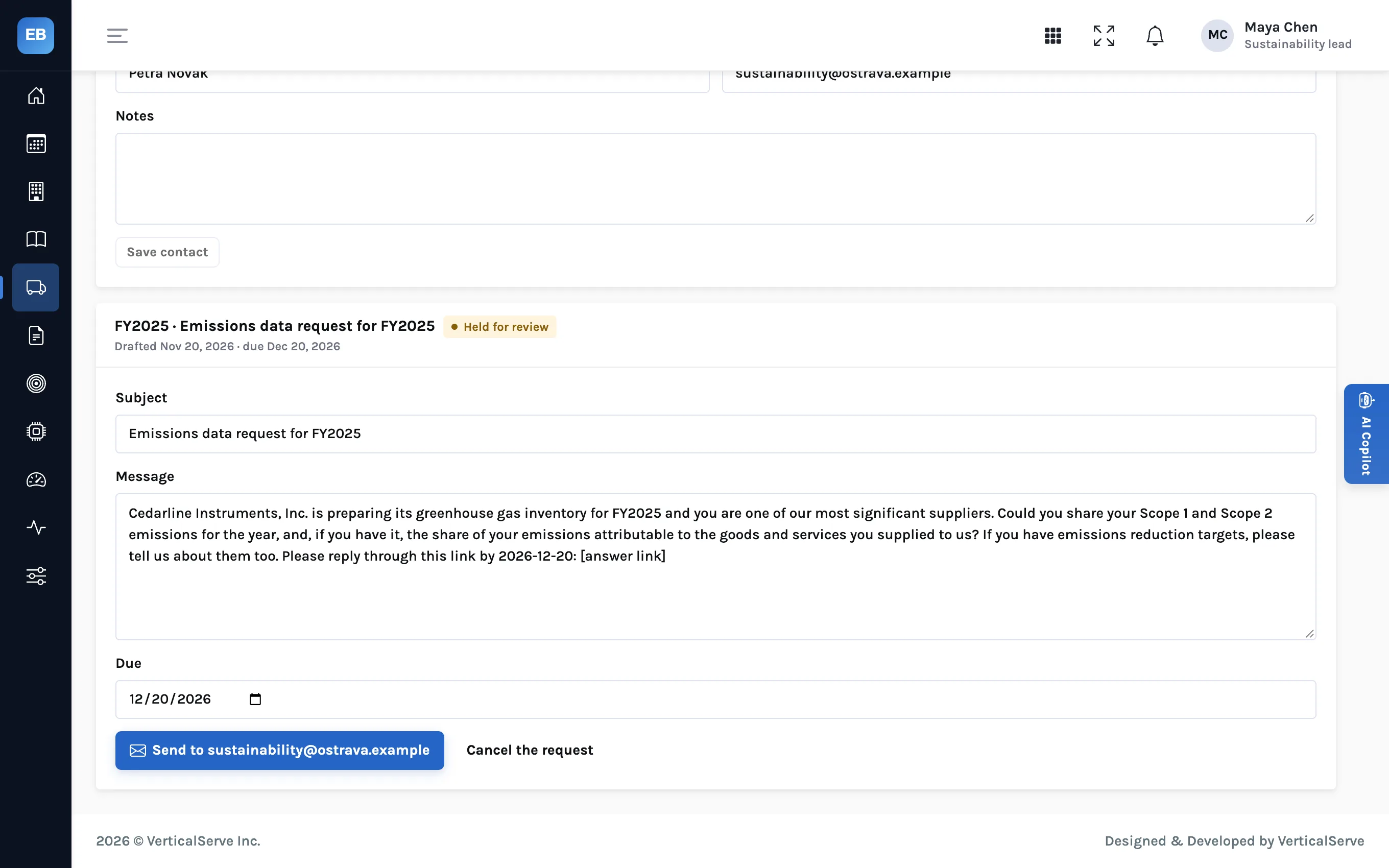
When you send, ESGBlade mints a fresh no-login answer link for that supplier. Only a hash of the link is stored, and the link itself is shown once. The supplier doesn't need an account.
Where email isn't delivered
Outside production, ESGBlade doesn't deliver email. The sender gets the message and the link to send themselves. The Suppliers page says so with an "Email delivery is off here" notice.
Step 3: what the supplier sees
The supplier's page shows who is asking and for which year, and the message you wrote. It never shows your spend with them or anything about your other suppliers.
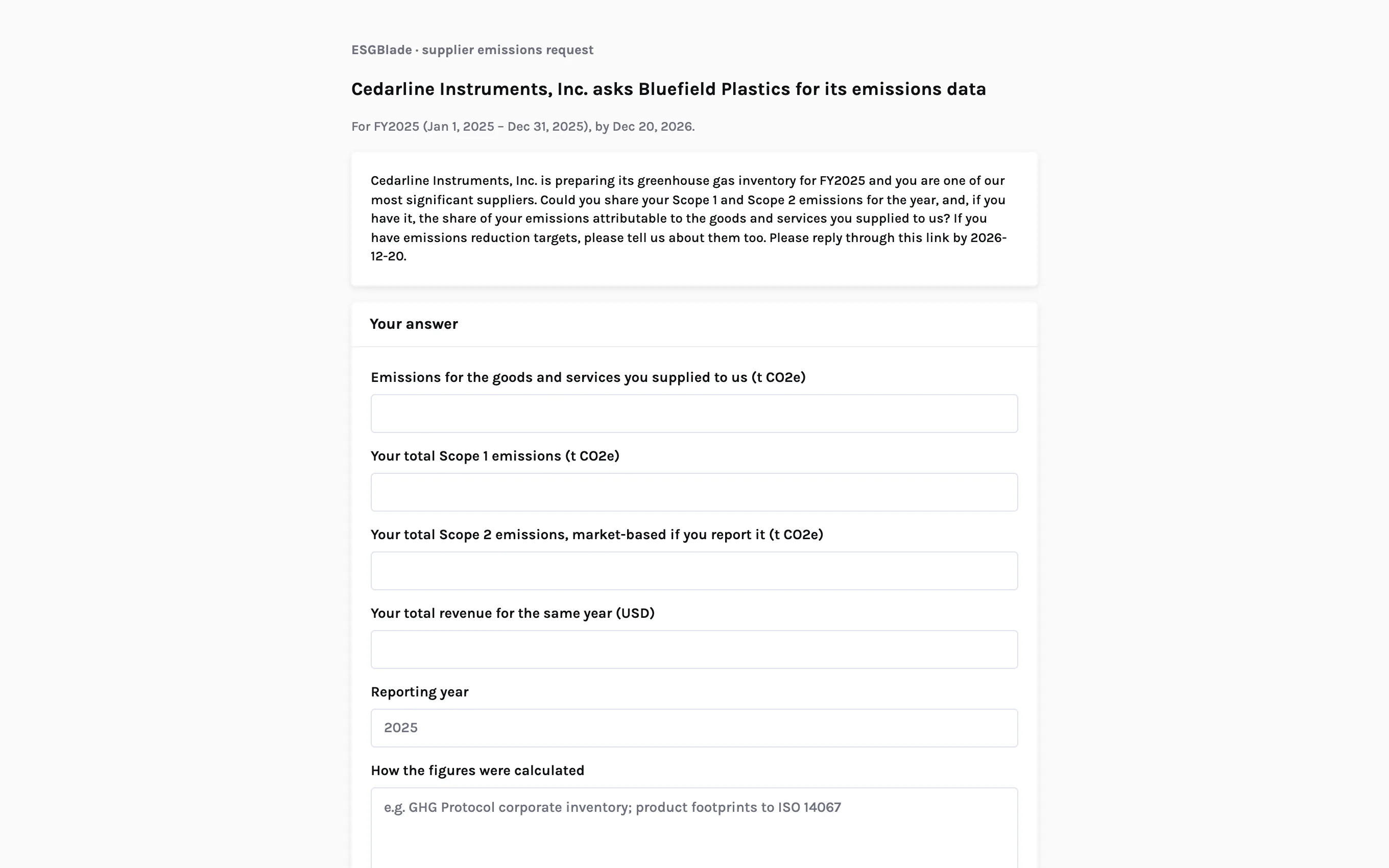
The supplier can answer in one of two ways:
| Option | What the supplier gives | What ESGBlade does with it |
|---|---|---|
| Emissions for what it supplied (preferred) | Tonnes for the goods it sold you, ideally cradle-to-gate | Uses the figure as given |
| Its own Scope 1, Scope 2 and revenue | Company totals and revenue | Allocates by your share of its revenue, and warns that this may understate |
Either way, the supplier can add its method, whether the figures were verified, its targets and its CDP response.
The warning on the second option matters. A supplier's Scope 1 and 2 cover only its own operations, not its own supply chain. A spend-based factor includes the supply chain. So an allocated Scope 1 and 2 figure is often lower than the estimate for reasons that have nothing to do with the supplier being cleaner. ESGBlade shows the warning so nobody takes the lower number at face value.
Step 4: compare, then decide
Halvard answered with 412.0 t cradle-to-gate, based on ISO 14067 product footprints, and verified. ESGBlade shows that next to the spend-based estimate of 503.6 t: a difference of −91.6 t.
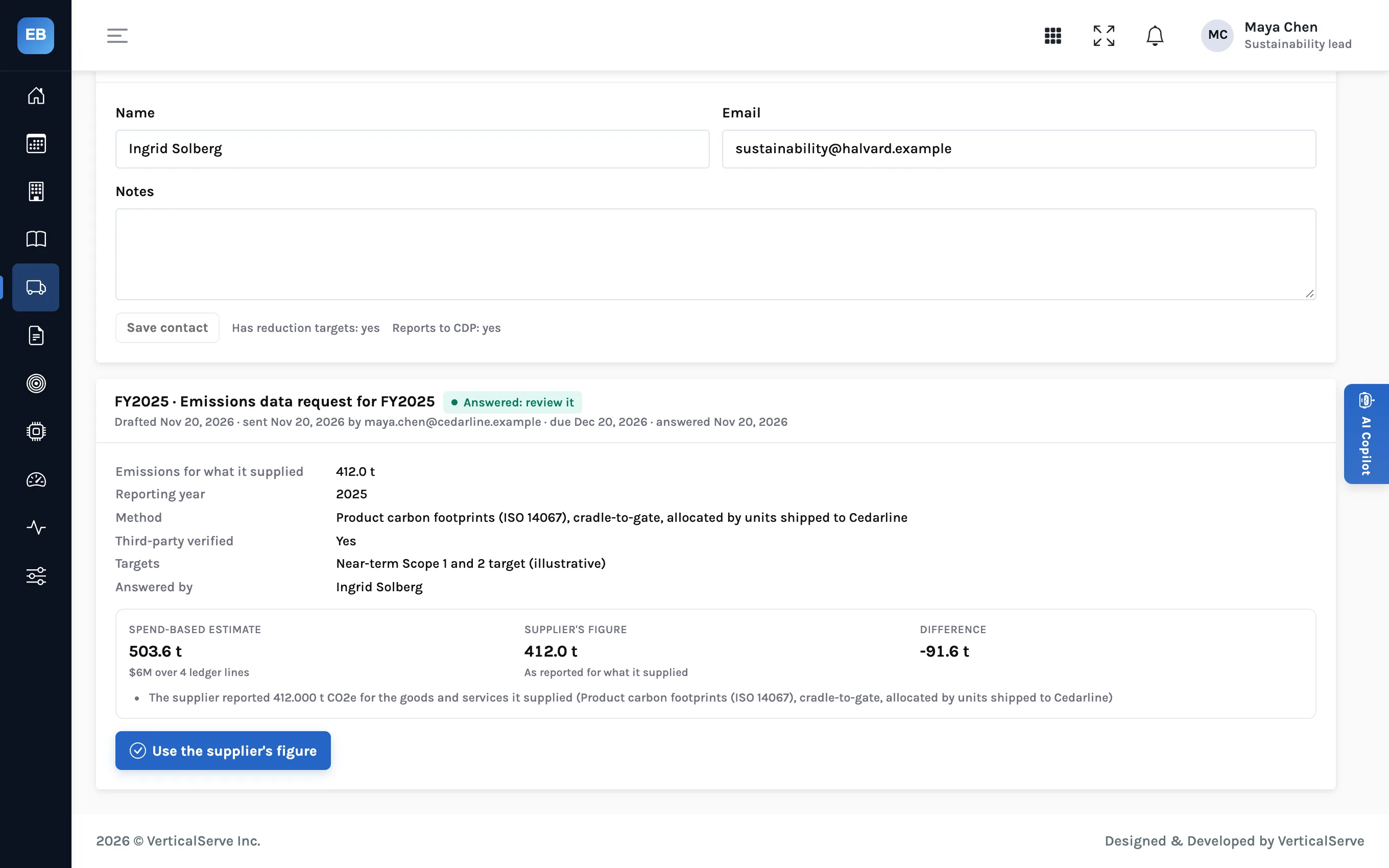
Using the answer is a person's call. Before choosing, check:
- The answer covers the same reporting year as your period
- It covers what you bought, not the supplier's whole output
- The boundary is stated (cradle-to-gate is what you want for purchased goods)
- The method and any verification are recorded
- If it was allocated from Scope 1 and 2, you've read the understatement warning
When you choose Use the supplier's figure, ESGBlade:
- Excludes that supplier's spend lines, recording the reason.
- Adds one supplier-specific line with the supplier's figure.
- Recalculates the period.
For Cedarline, that would lower Scope 3 by 91.6 t. At the time of the screenshots, the answer is waiting for a person to use it, Pemberton's request has been sent and is waiting, and Ostrava's is held for review.
If you change your mind, Go back to the estimate undoes it: the spend lines return and the supplier-specific line goes.
What changes in your disclosures
Once supplier data is in use, the methodology text in disclosures says how much of Scope 3 comes from supplier data rather than spend. On the Suppliers page, the share from suppliers' own data rises from 0%. That gives a reader of your ESRS E1 or questionnaire answers an honest picture of how your Scope 3 was built. See frameworks for the disclosures ESGBlade drafts.
- A supplier figure replaces the estimate only for that supplier; the rest stay spend-based.
- Every step, from sending to using to undoing, is in the audit trail with who did it.
Where people stay in charge
- Requests are held until a person sends them. You can change the subject, the message and the due date before anything leaves ESGBlade.
- Using a figure is a person's call. A supplier's figure replaces the estimate only when a person chooses Use the supplier's figure, and the choice can be undone.
- The supplier's method stays visible. ESGBlade records the method and verification the supplier states, so the person deciding can weigh them.
For how agents prepare these requests without sending them, see agents prepare, people decide.
Ask the few suppliers that matter, show them only what they need, and let a person decide when their number replaces yours.
Try it on your own data
ESGBlade is free. Tell us about your company and we'll set up a workspace for your first reporting period.
Request a demo